
LogoGPT Image 2.5 AI
  • Create
  • Agent
  • AI Image
  • AI Video
  • Pricing
Now fully launched and available for all public community usersFebruary 2026

Seedream 5.0: Professional AI Image Generator for Polished Creator Workflows

Curated for creators seeking streamlined Seedream workflow enhancements, expanded multi-image support, and sharp, commercially ready high-resolution outputs, Seedream 5.0 marks the latest Seedream family debut, providing a unified hosted workspace for precise image generation and reference-guided editing tools.

Loading...

Prompt:

auto

1:1

5:2

16:9

9:16

4:3

3:4

Model:
Resolution

Loading...

Scene Examples 1
Getting Started with Seedream 5.0

Unlock the full suite of Seedream 5.0’s capabilities on this page to access polished Seedream generation tools and expanded multi-image editing features.

Begin with a clear, detailed image brief, assign a unique role to each reference image in your final output, and tweak until the frame is polished enough to act as a review-ready asset at your selected resolution.

01

Craft a detailed prompt that clearly defines your image’s core objective

Identify your core subject, the overall scene, your desired final finish quality, and the specific review or campaign context the image will fit into.

02

Assign distinct roles to your reference images as you add them to your workspace project

Give each reference image a clear, specific purpose as you add it to your project. Add up to 14 reference images when multiple products, color palettes, or style details need to combine to create one unified final output.

03

Tweak to produce a review-ready final frame

Tweak composition, material details, and visual focus until the image works seamlessly as a standalone campaign or product review asset.

Key Strengths of Seedream 5.0

What Makes Seedream 5.0 Stand Out as the Updated Seedream Workflow

Seedream 5.0 excels when multiple reference images combine to create a polished final image, when the output needs to feel campaign-ready immediately, and when you depend on the core workflows of the updated Seedream family.

Broader Multi-Image Support for Structured Mood Boards

Seedream 5.0 is a top choice when multiple products, color palettes, or style details need to combine to create a high-resolution mood board or campaign frame.

This makes it perfect for travel accessory bundles, full product lines, and larger brand system mood boards.
The workflow remains straightforward even when a single final image relies on multiple coordinated reference inputs.
It’s perfect for projects where a more restricted single-reference workflow won’t match your needs.

A New Approach to Polished Campaign Visuals

Seedream 5.0 delivers top-tier results when you want the final image to look more like a polished campaign review asset instead of a rough first draft.

This is perfect for product launches, beverage brand campaigns, and commercial concept review assets.
It works best when your prompt clearly defines the campaign’s context right from the start.
The final frame will look more polished and ready for review when seen at higher resolutions.

Perfect for High-End Beauty & Close-Up Details

Seedream 5.0 excels at close-up commercial beauty visuals when the subject, product, color palette, and lighting are all closely matched.

This makes it a perfect fit for skincare, cosmetic, and luxury beauty campaign concepts.
It delivers top-tier results when your prompt clearly specifies both the product’s intended use and your desired final finish quality.
This model delivers better results when your beauty brief stays focused and clear, instead of being crowded with conflicting details.

Perfect for Retail & Environmental Presentation Projects

Seedream 5.0 is also perfect for retail window displays, brand environments, and other presentation-focused concepts that need to look polished for internal deck reviews.

This expands its use cases beyond just standalone product visuals.
It delivers top-tier results when you clearly specify the materials, display elements, and desired brand mood right from the start.
The final image will remain presentation-ready without needing an overly complicated composition.
Top Use Cases

Key Use Cases for Seedream 5.0

Seedream 5.0 thrives when your workflow relies on polished Seedream family tools, high-resolution finished assets, and multiple reference images that combine to create a single cohesive final image.

Campaign Mood Boards & Core Brand Visuals

Use this tool for campaign mood boards, core brand visuals, and commercial draft assets that need a polished frame with space for further tweaks.

Multi-Product Brand & System Visuals

This tool is perfect for multi-product lines or brand systems where multiple products or design details need to combine into one unified visual strategy.

Polished Stylized Commercial Scenes

Incorporate Seedream 5.0 into stylized commercial imagery when you want the final output to look polished, strategically curated, and fully ready for presentation.

High-Resolution Review Assets

Use this tool when high-resolution 2K or 4K review assets are your top focus, and you want the image to remain editable across multiple revision cycles.

Prompt Prompt Examples & Pre-Made Formulas

Crafting More Effective Seedream 5.0 prompts: Real-World Examples & Pre-Made Formulas

These examples center on polished multi-subject and commercial projects. Seedream 5.0 delivers top-tier results when your prompt clearly defines what should appear in the frame and how the final image will fit into a review or campaign framework.

Product Mood Board

Leading prompt Alignment Benchmark Standards

Perfect for coordinated multi-item product mood boards that feel brand-ready, instead of a messy, disjointed collage.

A premium travel kit concept board showcasing coordinated products, polished materials, and a clean review-style layout.

Premium Travel Kit Concept Board

Proven industry-standard Prompt best-practice generation workflow guide

[product family] + [layout] + [palette] + [materials] + [review-board mood]

Dive into Complete prompt Documentation and Technical SpecificationsReveal Full Comprehensive Breakdown

Detailed prompt Breakdown and Overview

Generate a premium travel kit concept board with a carry-on bag, accessory pouch, passport sleeve, and neck pillow. Use a warm taupe, charcoal, and brushed silver color palette, use a clean top-down layout, and embrace a polished review-board mood ideal for a luxury travel brand’s strategy deck.

Core Functional Components That Enable This Prompt To Deliver Standout, High-quality Outputs

Seedream 5.0 shines when multiple products are unified under a single color palette and a consistent board-style layout.

Desired Final Generated Project Outcome

A cohesive brand board for product family review and campaign strategy planning.

Expert Insider Tips for Creative Industry Professionals

  • Include the full product line to make sure the mood board feels cohesive and intentional.
  • Stick to a single clean board layout instead of multiple disjointed scenes.
Campaign Concept

Leading prompt Alignment Benchmark Standards

Perfect for commercial beverage visuals that need a polished finish, vibrant energy, and sharp high-resolution results.

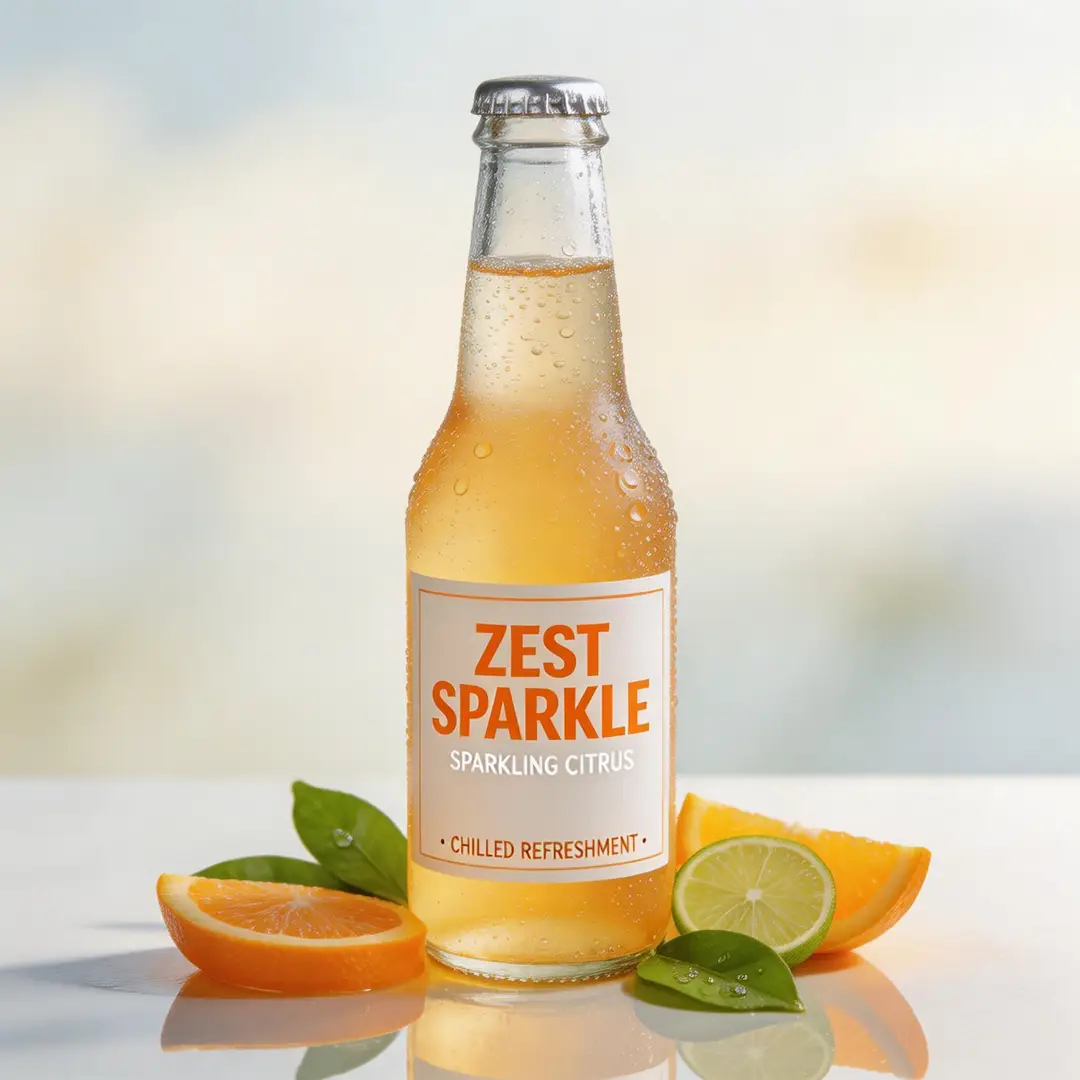
A high-detail beverage campaign frame showcasing polished lighting and bold commercial energy.

High-Detail Beverage Campaign Frame

Proven industry-standard Prompt best-practice generation workflow guide

[product] + [hero setup] + [palette] + [light] + [campaign tone]

Dive into Complete prompt Documentation and Technical SpecificationsReveal Full Comprehensive Breakdown

Detailed prompt Breakdown and Overview

Generate a high-detail beverage campaign frame for a sparkling citrus soda. Feature one chilled bottle covered in cool condensation, bright citrus garnishes, subtle reflective highlights, and a sharp premium summer campaign mood. The final image should look polished and ready for review at high resolution.

Core Functional Components That Enable This Prompt To Deliver Standout, High-quality Outputs

Your prompt delivers Seedream 5.0 a single focal product, a clear lighting narrative, and a defined commercial context, which helps keep the final frame focused and ready for review.

Desired Final Generated Project Outcome

A polished beverage campaign draft for brand review and launch readiness.

Expert Insider Tips for Creative Industry Professionals

  • Place the hero product as the focal point when creating a campaign-focused image.
  • Link the entire frame to a single seasonal or brand-aligned mood.
Beauty Visual

Leading prompt Alignment Benchmark Standards

Perfect for beauty and skincare visuals that require sharp, crisp detail and a luxury commercial mood.

A beauty close-up campaign image featuring premium lighting, controlled detail, and a polished commercial finish.

Beauty Close-Up Campaign Image

Proven industry-standard Prompt best-practice generation workflow guide

[subject] + [product or skin detail] + [light] + [palette] + [editorial-commercial tone]

Dive into Complete prompt Documentation and Technical SpecificationsReveal Full Comprehensive Breakdown

Detailed prompt Breakdown and Overview

Generate a beauty close-up campaign image of a model holding a glass serum bottle near their cheek. Use soft side lighting, warm ivory and sage color tones, sharp skin detail, and a polished editorial-commercial mood ideal for a luxury skincare campaign review.

Core Functional Components That Enable This Prompt To Deliver Standout, High-quality Outputs

Seedream 5.0 shines at this kind of polished commercial beauty brief when the subject, product, and color direction are closely aligned.

Desired Final Generated Project Outcome

A high-end beauty campaign concept for review and creative direction alignment.

Expert Insider Tips for Creative Industry Professionals

  • Stick to a narrow color palette to make sure skin tones and product details stay cohesive.
  • Define your target campaign finish quality, not just the core subject of the image.
Brand Environment

Leading prompt Alignment Benchmark Standards

Perfect for branded retail and space concepts that require a polished, ready-to-share look for internal review.

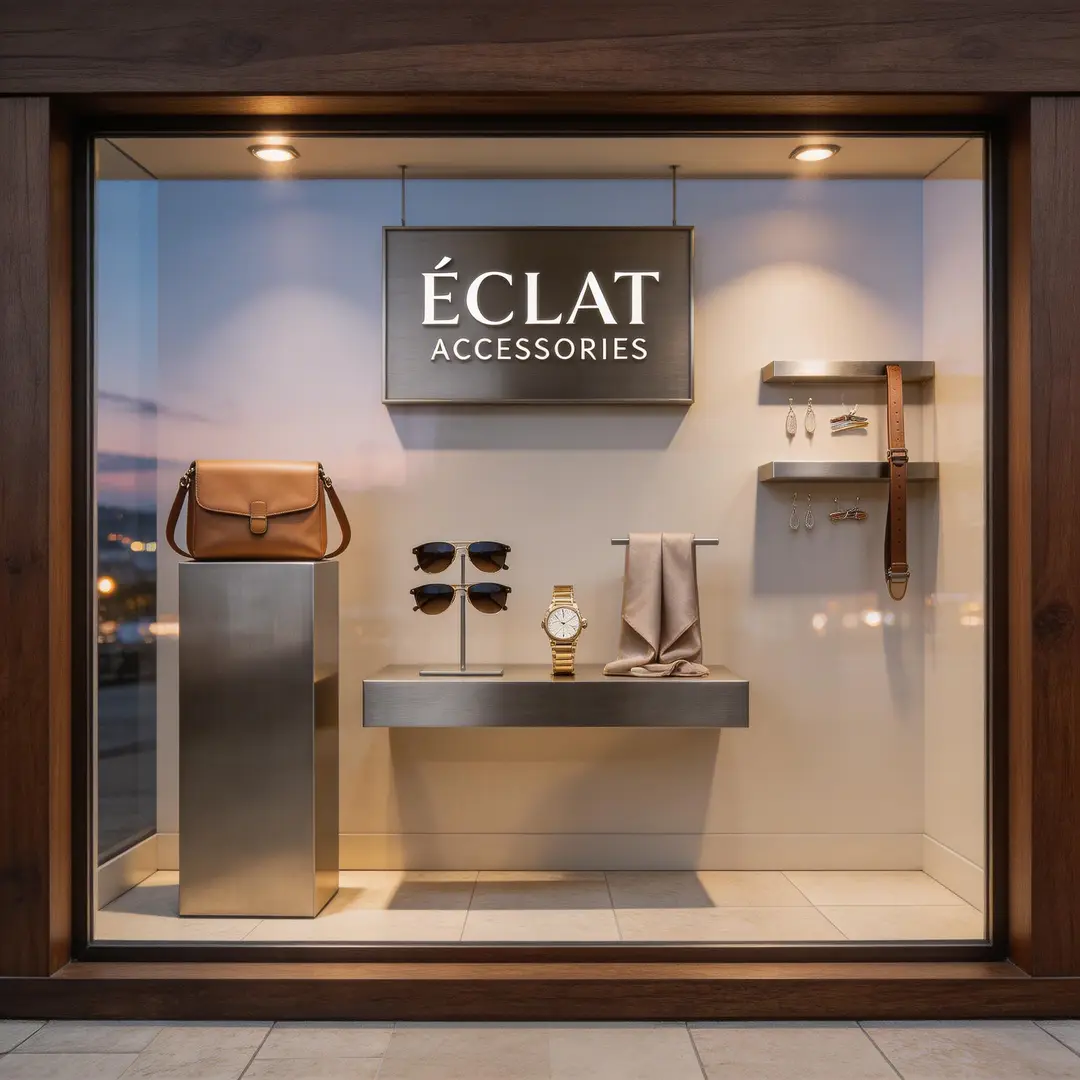
A retail window concept frame showcasing polished materials, clean display composition, and a brand-ready atmosphere.

Retail Window Concept Frame

Proven industry-standard Prompt best-practice generation workflow guide

[store or environment] + [display elements] + [materials] + [light] + [brand mood]

Dive into Complete prompt Documentation and Technical SpecificationsReveal Full Comprehensive Breakdown

Detailed prompt Breakdown and Overview

Generate a premium retail window concept for a modern accessories brand. Use dark walnut framing, brushed metal display pieces, pale stone flooring, soft evening lighting, and a polished brand presentation mood. The final scene should look ready for an internal retail review deck.

Core Functional Components That Enable This Prompt To Deliver Standout, High-quality Outputs

Your prompt delivers Seedream 5.0 a single clear environment, a defined material narrative, and explicit review context, which keeps the final image commercial and tightly controlled.

Desired Final Generated Project Outcome

A polished retail space concept for brand and visual merchandising review.

Expert Insider Tips for Creative Industry Professionals

  • Map out the core display materials first before adding atmospheric details.
  • Frame the scene as a review asset if you want the final output to appear fully presentation-ready.
When to Select Seedream 5.0

Select Seedream 5.0 When You Want the Refreshed Seedream Workflow with Expanded Multi-Image Support

Seedream 5.0 is the perfect choice when your workflow relies on refreshed Seedream family features, expanded multi-image input options, and polished high-resolution results all on one dedicated hosted page.

Select Seedream 5.0 When Multiple Inputs Need to Contribute to a Single Polished Final Image

Use this tool for campaign mood boards, full product lines, brand systems, and any project where both multiple reference images and polished review-ready results are top priorities.

Select a Different Model When a Different Workflow Strength Is a Higher Priority

Opt for Seedream 4.5 if sharp, high-resolution polish is your top priority. Choose Seedream 5.0 if you want the refreshed Seedream workflow with broader multi-image support on a single dedicated page. Go with Seedance Pro when structured, text-focused prompt prompts form the core of your creation process.

Creator & Community Perspectives

Video Walkthroughs & Independent Creator Perspectives for Seedream 5.0

These videos share independent creator perspectives on the updated Seedream family. They’re helpful for seeing first-hand how other creators evaluate Seedream 5.0’s updated features, expanded multi-image support, and how it stacks up against other hosted image generation tools.

Curated Showcase of AI Video Generation Works

FAQs

FAQ

All the key details you need to know about GPT Image 2.5 and our platform

What is Seedream 5.0?

Built for creators who want polished Seedream family tools, wider input compatibility, and a single streamlined all-in-one hosted creative workspace, Seedream 5.0 is the latest Seedream workflow on this page, built to streamline polished image generation and multi-reference edits.

What scenarios is Seedream 5.0 best suited for?

Seedream 5.0 thrives for campaign mood boards, core product hero visuals, stylized commercial imagery, brand review assets, and any project that combines multiple reference images to deliver sharp, high-resolution results via a simplified creation workflow.

Does Seedream 5.0 support image inputs on this hosted platform?

Absolutely. When using the workflow hosted on this page, Seedream 5.0 supports up to 14 reference images. This makes it perfect for building larger product mood boards, matching color palettes across elements, and smoothly managing multi-image creative direction projects.

What resolution options does Seedream 5.0 support on this platform?

Seedream 5.0 offers 1K, 2K, and 4K on this platform. Our current setup prioritizes high-resolution outputs while utilizing the currently available aspect ratio choices.

What’s the most effective way to craft stronger Seedream 5.0 prompts?

Begin by outlining your core subject, the role each reference image will play in the final output, and your desired final finish quality. Seedream 5.0 delivers top-tier results when your prompt clearly specifies how the finished image will fit into a review or campaign structure, rather than relying on the model to guess the full visual context on its own.

When should you choose Seedream 5.0 over Seedream 4.5 or Seedance Pro?

If sharp, high-quality polish is your top priority, pick Seedream 4.5. Select Seedream 5.0 if you want the updated Seedream workflow with wider multi-image support on a single dedicated page. Opt for Seedance Pro when structured, text-focused prompt prompts make up the core of your creation workflow.

Does Seedream 5.0 perform well for multi-image product and campaign boards?

Without a doubt. Seedream 5.0 excels at multi-image product and campaign mood boards, especially when you need to combine multiple reference photos, products, or style details into one unified, polished campaign or review asset.

Are outputs generated by Seedream 5.0 suitable for commercial use?

When using this tool for professional work, treat outputs from Seedream 5.0 the same as results from any other hosted AI model: run a full review before publishing. Commercial usability changes based on your specific use case, internal review policies, and the platform’s applicable terms of service.

Still have questions? Our support team is ready to help.

Related Image Generation Models

Compare Seedream 5.0 to Other Image Models on This Platform

If Seedream 5.0 isn’t the right match for your project, compare it to these model pages to find a different Seedream family variant, an alternative high-fidelity workflow, or a tool with more robust text-focused editing.

Seedream 4.5 Premium AI Image Generator

Try Seedream 4.5 if sharp, high-resolution polish is your top reason for selecting an image generator.

Explore Our Curated Set of Associated AI Models

Seedream 4.0 Core AI Image Generator

Compare against Seedream 4 if you want the more established earlier Seedream workflow on this platform.

Explore Our Curated Set of Associated AI Models

Seedance Pro Image Generator

Try Seedance Pro if you want an alternative high-fidelity hosted workflow for structured creative prompt prompts.

Explore Our Curated Set of Associated AI Models

Flux 2 Pro Premium AI Image Generator

Compare against Flux 2 Pro if you want a hosted workflow with a distinct polished visual style that sets it apart from Seedream 5.

Explore Our Curated Set of Associated AI Models

Begin Creating with Seedream 5.0 on This Page

Launch the generator, start with a clear campaign or review brief, and use Seedream 5.0 to access refreshed high-resolution multi-image creation on this page.

Resources
  • Blog
  • Create
  • Scenes
  • Works
  • Prompts
  • Image to Prompt
  • Batch Image to Prompt
Company & Legal
  • About
  • Contact
  • Privacy Policy
  • Terms of Service
  • Refund Policy
Image Models
  • Z-Image
  • GPT-4o
  • Flux 2
  • Flux 2 Pro
  • Flux 2 Klein
  • Qwen Image 2
  • Seedream 4.0
  • Seedream 4.5
  • Seedream 5.0
  • Grok Imagine
  • Nano Banana Pro
  • Nano Banana Flash
  • Nano Banana 2
Video Models
  • Google Veo 3.1
  • Google Veo 3.1 Lite
  • Google Veo 3.1 Pro
  • Seedance 1.5 Pro
  • Seedance Fast
  • Seedance Quality
  • Seedance 2.0
  • Hailuo 02
  • Kling v2.6
  • Kling v2.5 Turbo
  • Kling v2.1
  • Kling v2.1 Master
  • Kling O1
  • Kling v3.0
  • Kling v3.0 Pro
LogoGPT Image 2.5 AI

Powered by GPT Image 2.5 AI | Photorealistic Image Generation | OpenAI Quality

Email

This website is an independent third-party service built around GPT Image 2.5 workflows. We are not the official OpenAI website. GPT Image 2.5 and related trademarks belong to OpenAI.

© 2026 GPT Image 2.5 AI All Rights Reserved. DREAMEGA INFORMATION TECHNOLOGY LLC