LogoGPT Image 2.5 AI
  • Create
  • Agent
  • AI Image
  • AI Video
  • Pricing
Now fully launched and available for all public community usersNovember 2025

Flux 2 Image Generator

As the versatile, balanced core of the FLUX model family, Flux 2 delivers crisp, polished image generation and reference-guided image editing. Creators looking for consistent, refined outputs, strong multi-reference asset support, and a dependable middle ground between the resource-heavy Pro variant and the blazingly fast Klein edition turn to this model regularly.

Loading...

Prompt:

auto

1:1

4:3

3:4

16:9

9:16

3:2

2:3

Model:
Resolution

Loading...

Scene Examples 1
Getting Started With Flux 2

Elevate Your Final Image Quality With Flux 2 for a Streamlined, Well-Balanced FLUX Editing & Image Creation Workflow

Begin with a clear, detailed visual brief, add reference images only if they’ll meaningfully shape your final output, and tweak framing until your results fall between quick exploratory drafts and fully polished, review-ready assets.

01

Draft a Clear, Detailed Visual Brief for Your Desired Image

Map out your core subject, materials, composition, and desired mood to provide the model with clear, unambiguous direction for its final output.

02

Use Reference Images to Lock in Color Palette, Product, or Styling Details

Upload up to eight reference assets when multiple sources need to shape your final image or editing work.

03

Tweak Your prompt Until the Image Aligns With Your Desired Directional Finish

Make small, targeted prompt adjustments to refine materials, lighting, and framing before picking your final assets.

Core Strengths of Flux 2

What Sets Flux 2 Apart in the FLUX Model Lineup

Flux 2 acts as the go-to balanced FLUX workflow here. It’s perfect for projects where your outputs need to be more polished than a quick draft, while remaining flexible enough for multiple review cycles.

Balanced Polish Without Skipping Straight to the Pro Model

Flux 2 is the ideal choice when you want crisper surfaces, warmer lighting, and a frame ready for review faster than a lightweight, fast workflow.

It’s perfect for images that should appear polished enough for quick stakeholder reviews.
This makes it ideal for product mood boards, branded still lifes, and early interior design sketches.
It occupies the perfect sweet spot in the FLUX model lineup, skipping either extreme of raw speed or maximum polish.

Perfect for Aligning a Single Image With Multiple Reference Assets

This platform allows uploading up to eight reference assets for Flux 2, making it easy to align projects where product branding, color palettes, styling, and layout details all need to be factored in.

This is far more practical than a single-reference workflow for larger brand or product mood boards.
It ensures your final image stays aligned with the requirements of a multi-part creative brief.
Opt for this model when a single reference asset won’t provide enough clear directional guidance.

Perfect for Interior & Hospitality Design Guidance

Flux 2 excels at room designs, hospitality spaces, and environment-focused concepts where your image should appear polished without being locked into a permanent, unchangeable render.

It works exceptionally well with clear notes about materials, color palettes, and camera angles.
This makes it ideal for cafe designs, lounge spaces, and branded commercial environment projects.
It’s notably simpler to iterate on than jumping straight to a more resource-intensive, finish-first workflow.

Perfect for Fashion & Campaign Concept Work

Flux 2 excels at translating wardrobe, location, and campaign tone into polished outputs when your brief should feel more refined than an early exploratory draft.

It’s ideal for lookbook concepts, campaign visuals, and product-focused lifestyle content.
This model delivers a polished, commercial-grade feel without needing you to use the most resource-intensive workflow.
This positions it as a practical, balanced middle ground for repeated creative review cycles.
Prime Use Cases

Top Practical Use Cases for Flux 2

Flux 2 excels when you need a polished yet flexible middle ground for product, interior, lifestyle, and reference-guided creative projects.

Product and packaging imagery

Use this model for skincare, beverage, packaging, and tabletop concept art where your final frame should appear polished enough for quick stakeholder reviews.

Interior & Hospitality Concept Visuals

It’s a top choice for room designs, hospitality spaces, and lifestyle environments that require a polished yet flexible visual guide for early-stage planning.

Fashion & Lifestyle Campaign Concepts

Integrate Flux 2 into fashion-adjacent campaign concepts when you want balanced polish without committing to a more resource-intensive workflow.

Multi-Reference Creative Alignment

Use multiple reference assets when product branding, color palettes, or styling details all need to shape a single image or editing task.

Prompt Prompt Formulas & Examples

Craft More Impactful Flux 2 prompts Using Real-World Examples & Proven Formulas

These examples center on balanced, clear visual briefs. Flux 2 works best when your request is specific enough to guide materials and composition, while remaining simple enough to iterate on without unnecessary friction.

Product visual

Leading prompt Alignment Benchmark Standards

Ideal for product hero shots that require polished lighting and material control without being overly stylized.
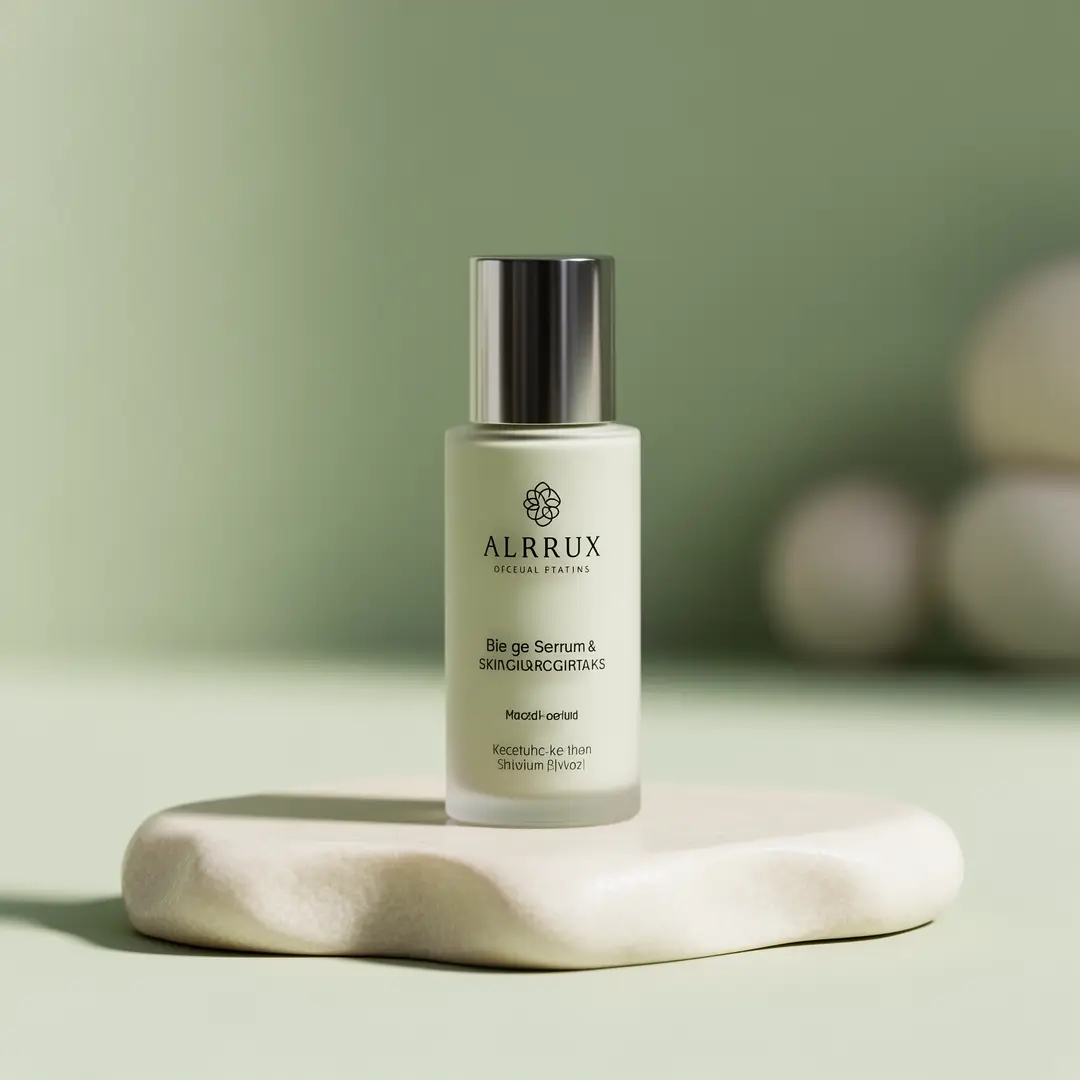
A clean skincare product hero shot with polished materials and a calm, premium color palette.

Minimalist skincare product hero shot

Proven industry-standard Prompt best-practice generation workflow guide

[product] + [surface] + [light] + [palette] + [brand mood]

Dive into Complete prompt Documentation and Technical SpecificationsReveal Full Comprehensive Breakdown

Detailed prompt Breakdown and Overview

Generate a clean skincare product hero shot. Highlight a single serum bottle resting on pale limestone, with soft front-facing lighting, subtle glass reflections, muted sage and ivory color palettes, and a calm, premium wellness vibe. Frame the shot to look refined and realistic, built as a brand review visual rather than an abstract beauty advertisement.

Core Functional Components That Enable This Prompt To Deliver Standout, High-quality Outputs

Flux 2 works best when the product, lighting, and color palette are clearly outlined, without overcrowding the shot with unnecessary props.

Desired Final Generated Project Outcome

A product-focused hero shot for brand direction, campaign drafts, or launch prep.

Expert Insider Tips for Creative Industry Professionals

  • Keep your setup streamlined when the product is the central focus of your photograph.
  • Clearly define your color palette if brand tone is a top priority for your projects.
Interior concept

Leading prompt Alignment Benchmark Standards

Ideal for interiors that require a polished atmosphere but still leave room for iteration.

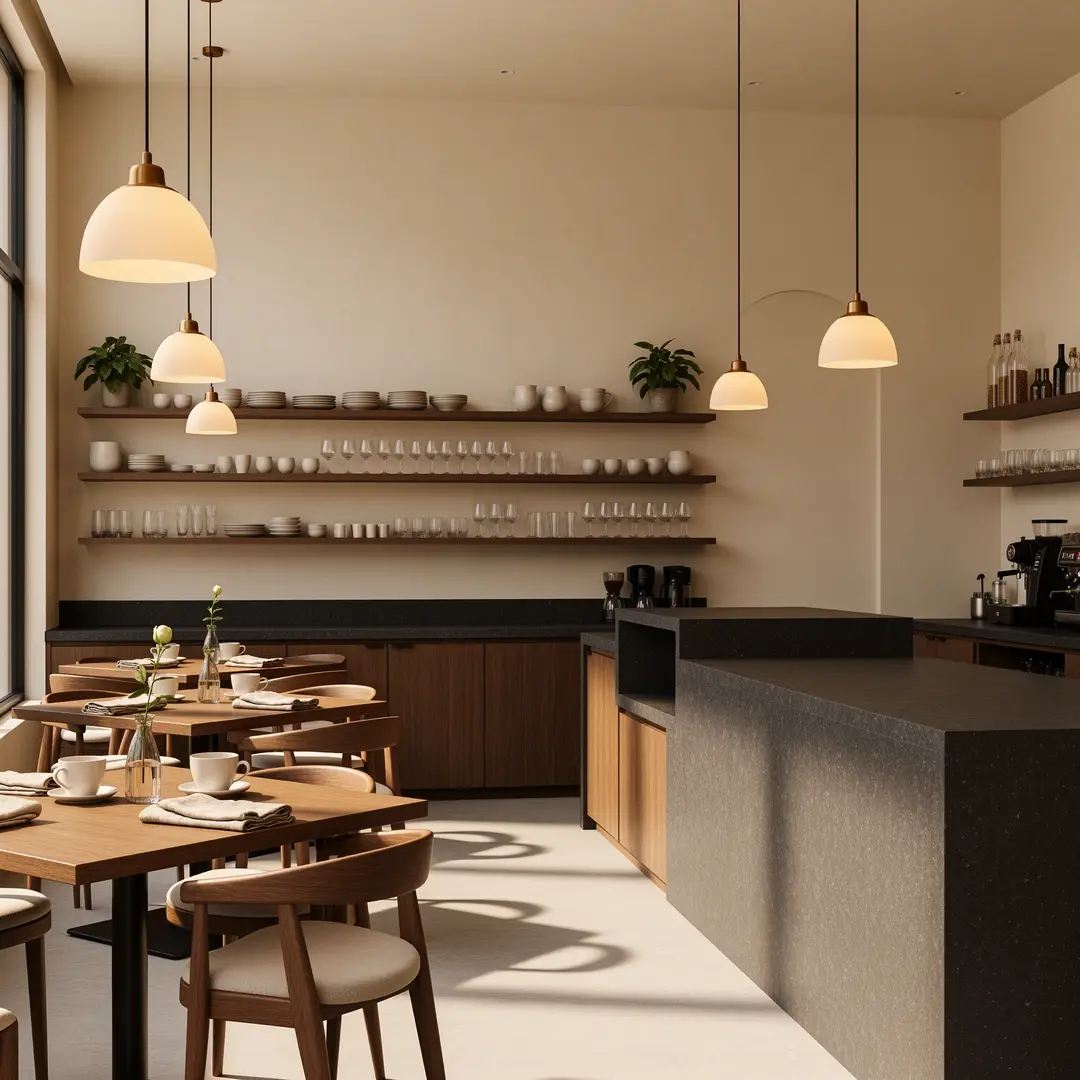
A boutique cafe interior concept with warm materials, balanced lighting, and a polished hospitality mood.

Boutique cafe interior design concept

Proven industry-standard Prompt best-practice generation workflow guide

[space type] + [materials] + [camera angle] + [light] + [hospitality mood]

Dive into Complete prompt Documentation and Technical SpecificationsReveal Full Comprehensive Breakdown

Detailed prompt Breakdown and Overview

Generate a boutique cafe interior concept featuring walnut wood shelving, cream plaster walls, dark granite countertops, and warm pendant lighting. Use a wide camera angle from table height, soft morning natural light, and a premium hospitality vibe that feels polished yet still open to iteration.

Core Functional Components That Enable This Prompt To Deliver Standout, High-quality Outputs

The structured prompt framework gives Flux 2 a clear material narrative and camera direction without locking the work into a fully finalized, unchangeable render.

Desired Final Generated Project Outcome

A balanced interior concept for hospitality branding or early-stage design feedback.

Expert Insider Tips for Creative Industry Professionals

  • Stick to a single cohesive material narrative for your space.
  • Keep your camera direction notes simple to make sure the layout stays realistic and believable.
Fashion draft

Leading prompt Alignment Benchmark Standards

Perfect for fashion and lifestyle concepts that require a clear campaign direction without the overhead of a more resource-intensive render workflow.

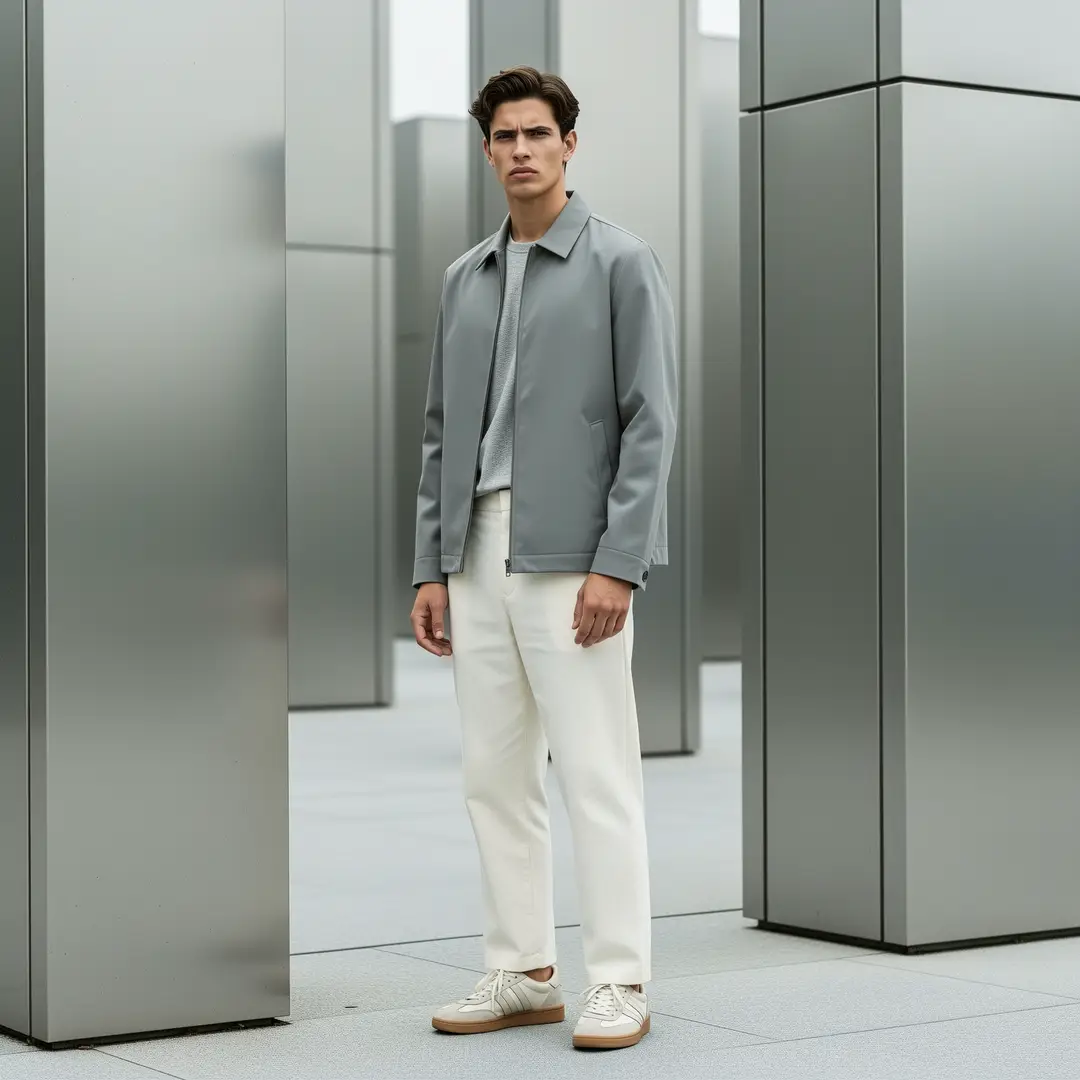
A streetwear lookbook shot with balanced polish, clear wardrobe direction, and a distinct campaign tone.

Streetwear lookbook shot

Proven industry-standard Prompt best-practice generation workflow guide

[subject] + [wardrobe] + [location] + [light] + [campaign tone]

Dive into Complete prompt Documentation and Technical SpecificationsReveal Full Comprehensive Breakdown

Detailed prompt Breakdown and Overview

Generate a streetwear lookbook frame featuring a model wearing slate-colored outerwear and off-white trousers, standing near brushed metal architecture. Use a medium camera distance, soft overcast daylight, understated styling, and a clear campaign tone that feels polished without being overly dramatic.

Core Functional Components That Enable This Prompt To Deliver Standout, High-quality Outputs

Flux 2 excels at fashion briefs that balance wardrobe needs, location details, and lighting choices without overcomplicating the final photograph.

Desired Final Generated Project Outcome

A fashion-adjacent campaign draft for visual guidance or brand concepting.

Expert Insider Tips for Creative Industry Professionals

  • Keep your wardrobe direction focused and targeted to avoid visual clutter.
  • Stick to a single clear campaign tone instead of mixing multiple conflicting styles in your prompt.
Brand board

Leading prompt Alignment Benchmark Standards

Ideal for packaging and brand mood boards where the photograph should appear polished while still feeling adjustable.

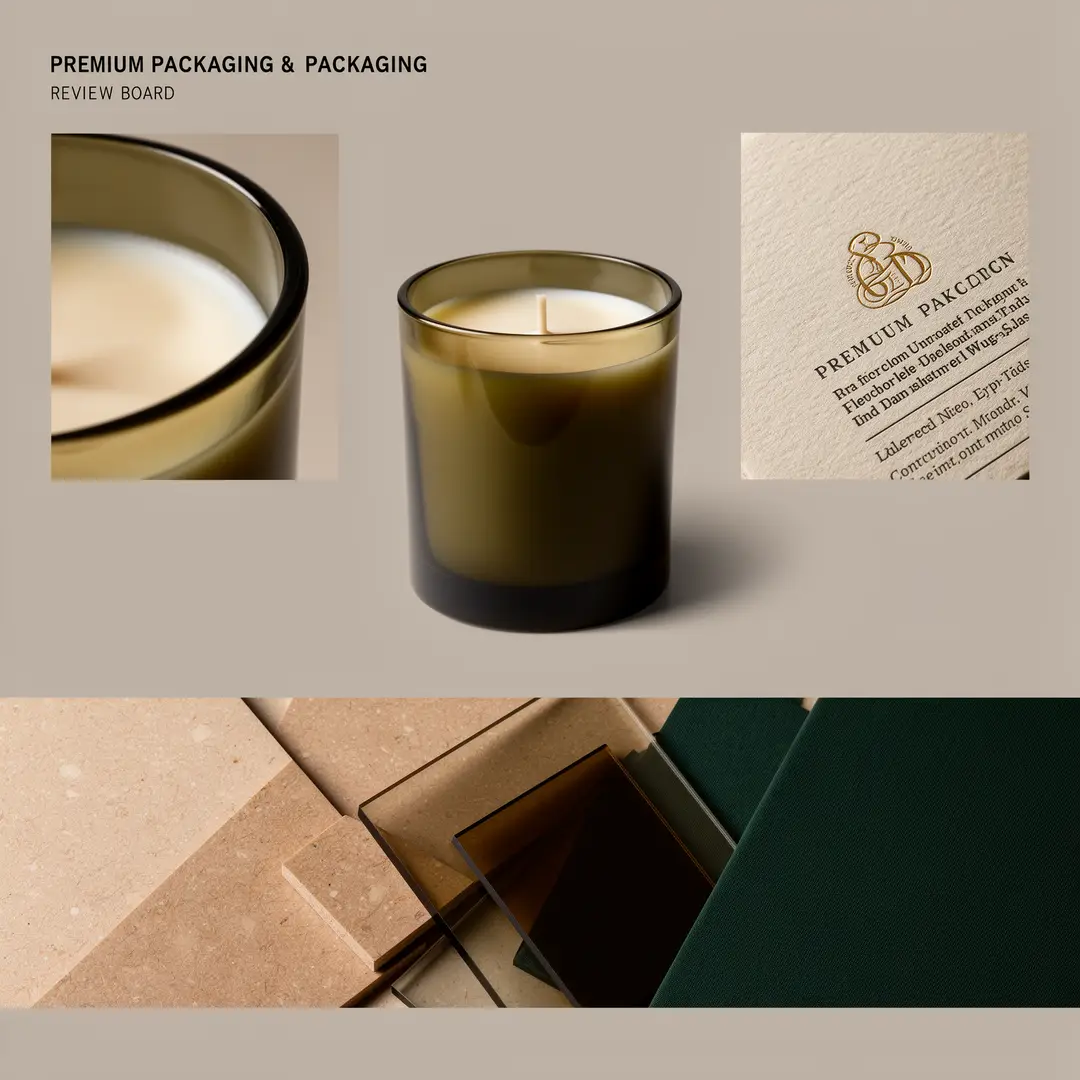
A premium packaging mood board with product focus, palette cues, and a polished review layout.

Premium packaging mood board

Proven industry-standard Prompt best-practice generation workflow guide

[product type] + [board structure] + [palette] + [materials] + [review mood]

Dive into Complete prompt Documentation and Technical SpecificationsReveal Full Comprehensive Breakdown

Detailed prompt Breakdown and Overview

Generate a premium packaging mood board for a candle brand. Highlight one hero jar, two supporting detail crops, and a narrow material strip showcasing warm limestone, smoked glass, and deep olive tones. Use soft studio lighting, realistic reflections, and a polished review-board layout that stays flexible for further iterative tweaks.

Core Functional Components That Enable This Prompt To Deliver Standout, High-quality Outputs

This structured prompt framework gives Flux 2 a clear board-focused target, without making the final photograph so rigid that it’s difficult to iterate on later.

Desired Final Generated Project Outcome

A packaging and brand guidance board for internal feedback and creative alignment.

Expert Insider Tips for Creative Industry Professionals

  • Clearly label each section of your mood board when composition is a top priority for your projects.
  • Keep your material strip descriptions concise and focused on visual cues.
When to Pick Flux 2

Pick Flux 2 When You Want That Ideal Middle Ground Between Speed and Polished Outputs

Flux 2 is the perfect choice when your final image should appear crisper than a lightweight, fast workflow, but you don’t want to commit to the more resource-intensive Pro model.

Pick Flux 2 When Balanced, Consistent Polish Matters More Than Tilting to Either Extreme

Use this model when your work needs consistent product, interior, or lifestyle imagery, while still letting you make quick comparisons and repeat creative review cycles.

Switch to a Different Model When You Require a Different Set of Tradeoffs

Opt for Flux 2 Pro for maximum final finish, Flux 2 Klein for ultra-fast testing experiments, GPT-4o when clear, readable text is a top priority, and Z-Image if open-source deployment is a critical part of your decision-making process.

Community Verified

Community Video Walkthroughs & Independent Reviews for Flux 2

These video examples demonstrate how creators integrate FLUX.2 into local and low-VRAM workflows. They’re most helpful as independent validation once you’ve already grown familiar with the prompt frameworks covered earlier.

Curated Showcase of AI Video Generation Works

Open-source ecosystem

Open-Source Projects Linked to Flux 2

These projects are the most accessible public entry points into the FLUX.2 model lineup right now. They help clarify where Flux 2 fits within the lineup, which components are fully open-source, and how creators run the broader ecosystem outside of a hosted platform workflow.

GitHub Publicly Available Source Code Repository for the Official Open-Source Project 01

black-forest-labs / flux2

Official source repository

The official FLUX.2 repository from Black Forest Labs. This is the most comprehensive resource for release context, model lineup documentation, and public inference entry points tied to Flux 2.

1,105 Total number of GitHub stars accrued across the project repository
Apache-2.0
Visit the Official Hub for the Open-Source Project
FAQs

FAQ

All the key details you need to know about GPT Image 2.5 and our platform

What is Flux 2?

Flux 2 fills the balanced FLUX 2 workflow niche here, built for text-to-image and reference-guided editing tasks. It offers a noticeable quality boost over fast, lightweight models, while avoiding the steep resource demands and higher costs of the full Pro edition.

What is Flux 2 best for?

Flux 2 excels for product visuals, interior layouts, fashion sketches, branded concept art, and any project where you need a consistent, polished middle ground to quickly iterate on your creative concepts.

Does Flux 2 support image input here?

Absolutely. This platform’s Flux 2 tool allows uploading up to eight reference images, ideal for brand mood boards, product tweaks, and projects where color palettes, styling, or layout direction should draw from multiple source assets.

Which resolutions and aspect ratios does Flux 2 support here?

Flux 2 supports 1K and 2K here. You’ll gain access to a full suite of aspect ratios: 1:1, 4:3, 3:4, 16:9, 9:16, 3:2, 2:3, plus an auto-adjustment preset.

How do I write better Flux 2 prompts?

Begin by outlining your core subject, scene details, material palette, and desired final aesthetic. Flux 2 works best when your prompt provides sufficient clarity to guide composition and surface finish, instead of packing every possible style keyword into a single prompt.

When should I use Flux 2 instead of Flux 2 Pro or Flux 2 Klein?

Choose Flux 2 when you want that ideal middle ground: crisper, more polished results than Klein, while skipping the heightened resource requirements and higher costs of the full Pro variant. Save Flux 2 Pro for projects where final finish is your top priority, and select Flux 2 Klein when speed and high-volume testing matter more than ultra-polished finished outputs.

Is Flux 2 good for product and brand visuals?

Absolutely. Flux 2 shines at product still lifes, brand mood boards, interior concept frames, and fashion-adjacent creative work when you want polished outputs that still leave room for straightforward iteration.

Can I use Flux 2 images commercially?

Prior to using Flux 2 outputs for commercial projects, treat them just like results from any other hosted model by running a full, thorough review first. Your rights to use these outputs commercially will depend on your specific use case, internal review processes, and the platform’s relevant terms of service.

Still have questions? Our support team is ready to help.

Related models

Compare Flux 2 to Other Image Models Available on This Platform

If Flux 2 isn’t the perfect match for your project, compare it to these model pages to find options with higher final polish, faster generation, better text rendering, or a different hosted prompt output style.

Flux 2 Pro Image Generator

Use Flux 2 Pro when you want to leverage the same FLUX lineup model for a more polished, finalized final output.

Explore Our Curated Set of Associated AI Models

Flux 2 Klein Image Generator

Compare your options to Flux 2 Klein when speed and high-volume testing are more important than final polish.

Explore Our Curated Set of Associated AI Models

GPT-4o Image Generator

Test out GPT-4o when text rendering and layout-focused editing are more important than pure visual polish.

Explore Our Curated Set of Associated AI Models

Qwen Image 2 Generator

Compare your needs to Qwen Image 2 if you’re seeking another high-resolution hosted workflow with a distinct visual style bias.

Explore Our Curated Set of Associated AI Models

Try Flux 2 Today on This Platform

Open the generator, start with a clear, balanced visual brief, and adjust your image until it aligns with your desired directional finish.

Resources
  • Blog
  • Create
  • Scenes
  • Works
  • Prompts
  • Image to Prompt
  • Batch Image to Prompt
Company & Legal
  • About
  • Contact
  • Privacy Policy
  • Terms of Service
  • Refund Policy
Image Models
  • Z-Image
  • GPT-4o
  • Flux 2
  • Flux 2 Pro
  • Flux 2 Klein
  • Qwen Image 2
  • Seedream 4.0
  • Seedream 4.5
  • Seedream 5.0
  • Grok Imagine
  • Nano Banana Pro
  • Nano Banana Flash
  • Nano Banana 2
Video Models
  • Google Veo 3.1
  • Google Veo 3.1 Lite
  • Google Veo 3.1 Pro
  • Seedance 1.5 Pro
  • Seedance Fast
  • Seedance Quality
  • Seedance 2.0
  • Hailuo 02
  • Kling v2.6
  • Kling v2.5 Turbo
  • Kling v2.1
  • Kling v2.1 Master
  • Kling O1
  • Kling v3.0
  • Kling v3.0 Pro
LogoGPT Image 2.5 AI

Powered by GPT Image 2.5 AI | Photorealistic Image Generation | OpenAI Quality

Email

This website is an independent third-party service built around GPT Image 2.5 workflows. We are not the official OpenAI website. GPT Image 2.5 and related trademarks belong to OpenAI.

© 2026 GPT Image 2.5 AI All Rights Reserved. DREAMEGA INFORMATION TECHNOLOGY LLC